March 24, 2011

Internation Children's Digital Library Featured 9-22-10

We are always encouraging our students to learn about other cultures and experience new insights through the perspectives of others.  What better way to teach this then through the literature of those cultures?


There are hundreds of full-length books from all around the world and in many different languages available to read in this digital library.  Use it to show images and script from other countries.  Use it to expose students to literature written by and for those who live in that culture.  Then, compare the literary styles to our own.  Take a fresh look at the world through the eyes of others!


Tip for usage:  While you are viewing the books, click F11 on your keyboard to enlarge the view and remove the toolbar at the top.

Kids.gov Featured 9-29-10

Teaching kids how to research is crucial to creating a 21st Century learner.  Help them to narrow their searches and introduce them to credible sites by using this week’s web tool.


This site is actually a portal to thousands of other sites with information covering all content areas and interests.  All of these websites have been screened to be kid friendly and accurate!  Every teacher in the building should be checking out this great resource! 

RSOE Emergency Disaster Information Service Featured 3-9-11

Be the first to know about emergencies taking place around the world!

RSOE Emergency Disaster Information Service

This web tool uses Google Maps to give up-to-date information about emergencies around the planet.  This service is updated every minute and includes seismic events, epidemics, nuclear energy emergencies, airplane accidents, etc.  Use it as a starting point for researching.  Click on any icon to get a bit of information about the event and then have your students find the whole story through news websites.

KETencyclomedia #1 - Discovery Education Featured 3-23-11

If you’re not using KETencyclomedia in your classroom, then you’re missing out!  Over the next three weeks I will feature the unique aspects of this wealth of educational resources!


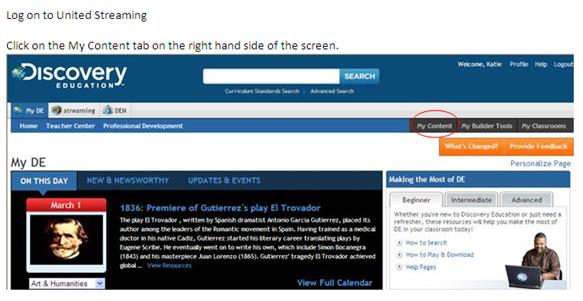
KETencyclomedia Feature #1  Discovery Education (aka United Streaming)

Many of you use Discovery Education (United Streaming) to find videos and photos that apply to your content, but one big complaint is that there is so much information to weed through.  Next time, give me a call with a topic in mind and I would be happy to narrow the search for you using the content sharing feature!  Or work with other teachers to share what you have found!  Check out the suggestions I made for the 8th grade science department by following these steps!  If you need information to log-in, let me know!


Double click on the different videos to view.  You can also click on the Choose button to copy the videos into your personal My Content folder.  Videos can be viewed as segments or full-video.

March 16, 2011

Study Stack Featured 3-16-11

Do you have important vocabulary that your students need to master?  Use this week’s web tool to create electronic flashcards and simple games for memorizing those key terms!

This web tool already has thousands of flashcard sets available on a wide variety of topics, but you can create your own specific sets as well.  The best part, in my opinion, is that your students can use the simple flashcard option to practice vocab, or they can also choose to play games (see the options below) that reinforce the information.  Students can even download the vocabulary and games to their smart phones and practice on the go. 


March 4, 2011

Voxopop Featured 10-6-10


Have any students who are reluctant to write about how they feel, but could talk your ear off??

Why not capitalize on their love of chatter by using this week’s web tool to help them communicate their thoughts.

This web tool allows you to create talk groups, similar to blogs except that you record voices rather than text.  Students can give opinions, debate topics, add new information, and ask  and answer those Critical Thinking questions from the Critical Thinking Student Tool in a brand new and fun way!

Dipity Featured 10-20-10

I personally love timelines.  They condense information to give a general overview as well as a few tidbits to encourage delving deeper into a topic.  Rather than a Power Point, have your students create timelines to demonstrate their knowledge!
 
This web tool allows you to develop timelines and imbed into them photos, links, videos, related articles, etc.  It really couldn’t be any easier.  There are even how-to videos available to walk you and your class through making a timeline.

There is also a library of timelines already created that could be used in classrooms.  Many current events are chronicled such as the story of the Chilean miners or even the progression of the World Cup last summer.    

Forvo Featured 10-27-11

Correct pronunciation of certain words is a highly disputed topic.  It becomes even more complicated when dealing with unfamiliar languages.  If you and your students come across any difficult words to pronounce, let the contributors of this week’s web tool settle the debate.
This web tool provides pronunciations of thousands of words in hundreds of languages.  It is a compilation of recordings by native speakers from different regions of the world.  Have a debate in your class and choose the pronunciations you all think are best!  Students could even contribute their own pronunciations to the site to give representation to our part of the country.


March 2, 2011

Magnetic Poetry Featured 3-2-11


Everyone loves to play with the magnetic poetry boards! 
Now have the same fun electronically!

This web tool allows you and your students to create poetry and stories using words provided in one of four kits.  No longer can kids say they can’t think of anything to write!


February 24, 2011

Wisemapping Featured 2-23-11

Rather than print out all their resources, have your students make an online linkable mind map!

This web tool allows you and your students to make simple mind maps where they can organize their research and link their websites in one location. 
This is an excellent tool for brainstorming and gathering data.  It can even be used collaboratively with other students!
Just think of all the paper we can save!